
WordPress is free and open source, but a production site rarely stays that way: plugins for SEO, forms, security, performance and translations add up fast, and so does the hosting they demand. Cradle CMS & eCommerce ships all of that in one installation, with eCommerce part of the core rather than an extension.
Get away from plugin dependency
Functionality that ships with Cradle CMS typically requires paid plugins or extra services on WordPress.
Feature |
Typical yearly costs for WordPress |
Cradle CMS & eCommerce |
|---|---|---|
Page builder |
$84-$240 |
Built in |
SEO |
$120 |
Built in |
Performance |
$60-$140 |
Built in |
Forms |
$29 (perpetual), $50-$60 |
Built in |
Translations |
$39-$130 |
Built in |
Security |
$120-$180 |
Built in |
Hosting |
$200-$400 (wix/woocommerce) |
$120 |
Total per year |
$573 - $1450 |
$120 |
Installation in three steps
The default installation needs almost no configuration and is also the most efficient setup for a single server. The web server, file storage, cache, SQLite database and automatic SSL certificates all are setup in the same installation. No Apache or Nginx, no MySQL, no PHP, no Redis, no performance or security plugins are needed.
Deploying on a single server takes three steps:
- Start a server On-prem or in the cloud.
- Configure the domain Point DNS at your domain name provider.
- Start Cradle and the site is live
Great performance out of the box
No need for external cache or off-loading to CDN.
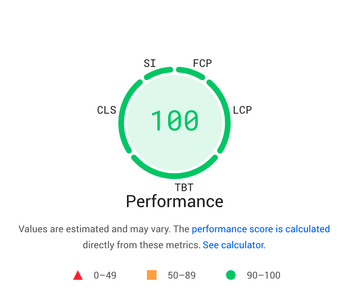
Cradle CMS & eCommerce software is written in Go, known for its fast execution speed which makes it ideal for building web platforms, where every millisecond counts. This speed is partly due to Go's unique concurrency features, allowing efficient use of system resources.
Our benchmark tests shows that our application handles 10 times more requests than php stacks. Server requirements for sites with 1 million monthly visitors are as low as 1 CPU, 512MB RAM, 1 GB Storage. Which translates to low monthly costs if using a cloud hosting service.
Scalability
Cradle software can be deployed in multiple ways thanks to it's architecture. The default installation is configured to deploy the system as a single-server but the configuration options for site, frontend and admin allows for much more complexity, such as a distributed multi-region setup.
For other architectures, see the Database options, Storage options or in our configuration documentation and on scalable setup
Comparison with other CMS platforms
See how Cradle CMS compares to traditional platforms like WP and Drupal.
Feature |
Cradle CMS |
WP |
Drupal |
|---|---|---|---|
Performance |
Excellent |
Fair |
Good |
Security |
Very high |
Medium |
High |
Scalability |
Excellent |
Limited |
Good |
API support |
Built-in |
Plugin required |
Module required |
Resource usage |
Minimal |
High |
Medium |