
Cradle eCommerce supports digital, licence and physical products with variants.
- Variant handling
Add variants to a product with options. - Multiple options
Multiple options for a product. - License support
Mark a product as a license. - Publish dates
Set publish dates and unpublish products. - Meta data
Fields for SERP meta data.
The object in Liquid is
{{ products }}, more information in the Liquid templating reference.
Product information
| Fields | Description |
|---|---|
| Title | Title of the product (mainly for internal reference, h1 is commonly used for storefront) |
| Handle | URL handle |
| Type | Intended for being able to specify the product type |
| Vendor | Product vendor |
| Key features | Key features for the product |
| Template | Controls the theme template used when rendering the page. |
| Content | Three types of content editors are available: RTE (rich text editor), MD (markdown) and HTML (markup) |
| Tags | Possible to add tags to the product for creating selections in admin or on store front. |
Product content
Add product content with rich text editor (RTE), markdown editor (MD) or markup editor (HTML).
Images
Featured image
The featured image singles out a main image for the product.
Additional images
Additional images can be batch uploaded.
Variants
A product commonly have options such as color or sizes, these are handled with the creation of variants.
- Multiple options can be created.
- Individual pricing
- Image assignment
- Shipping dimensions
Variant information
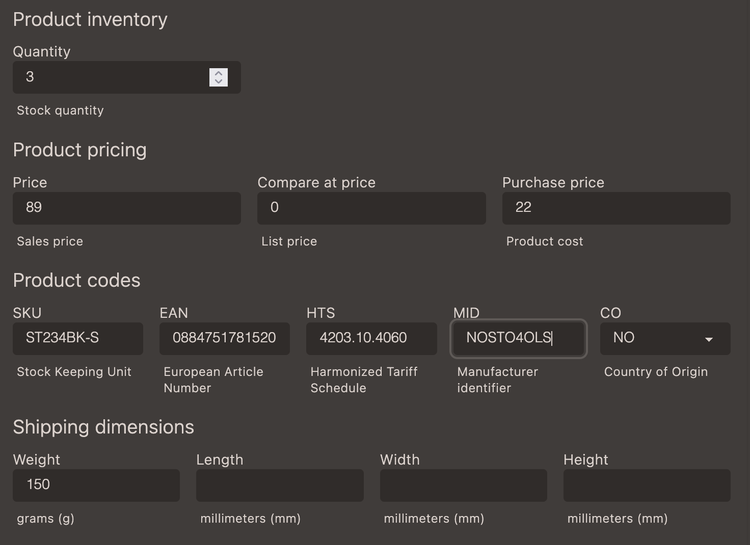
| Field | Description |
|---|---|
| Image | An image is assigned from the uploaded images. |
| Quantity | The number of items or units of a product available. |
| Price | The selling price of a product |
| Compare at price | The original price for the product, used if the selling price is reduced during a sale |
| Purchase cost | Internal cost for the product |
| SKU | Stock Keeping Unit, used as an identifier internally for inventory management but can also be used externally as a part of the product information. |
| EAN | European Article Number, a 13-digit barcode used to internationally identify retail products |
| HTS | Harmonized Tariff Schedule code, 10-digit numbers that are used universally in international trade to help importers and exporters to find and calculate the duty or tax on their products. |
| Shipping dimensions | Weight and dimensions (length, width and height) can be specified for shipping rate calculations. |
Add to collection
Add a product to a manual collection.
Meta
Add heading (h1) for website, meta title and information used for meta fields in theme for SEO.
Inventory and shipping
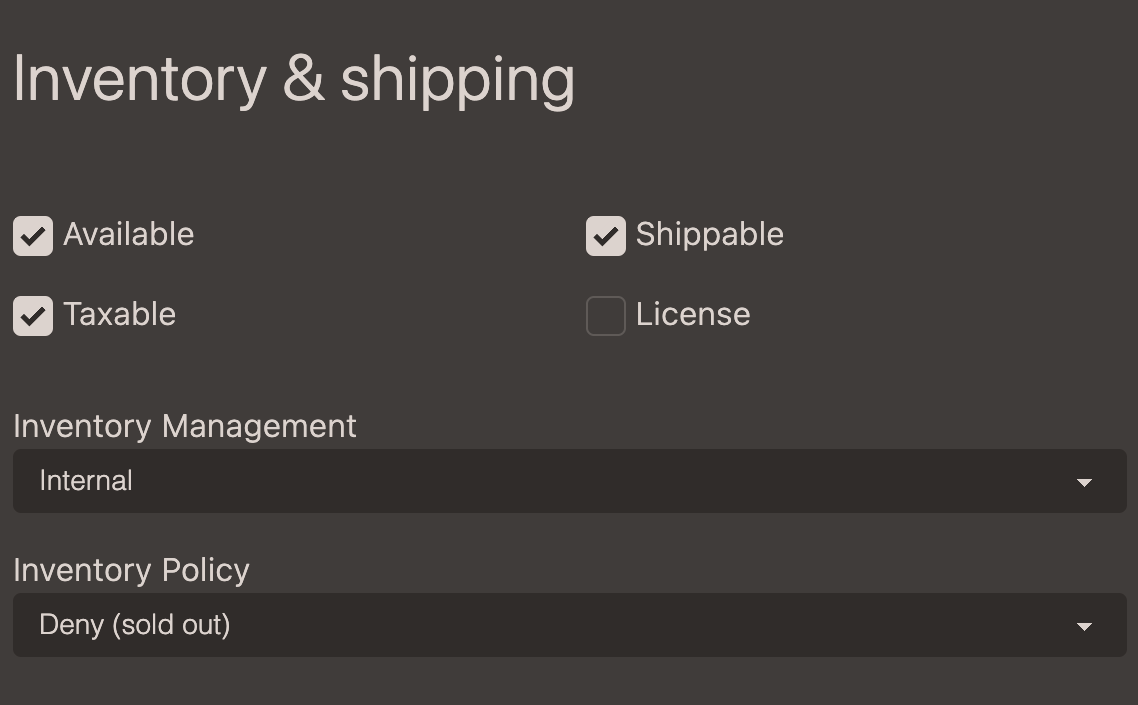
Availability of a product depends on Quantity and Inventory Policy. The Available setting is a quick way to pause or halt product sales without unpublishing it and will make the product unavailable yet still visible in the shop, whereas an unpublished product is hidden.
| Field | Value | Description |
|---|---|---|
| Available | True(default) / False | A manual toggle/override for making a product unavailable for purchase yet still visible in the shop. |
| Shippable | True(default) / False | Declares that the product needs shipping. |
| Taxable | True(default) / False | Declares that the product is taxable. |
| License | True / False(default) | Declares that the product is a license. |
| Inventory Management | Ignore / Internal(default) | Set to ignore (external services handles inventory or inventory management is not required) or internal, with internal is default. |
| Inventory Policy | Accept / Deny(default) | Accept backorders or Deny (default setting). |
Visibility
Control the publish date on the website or sets the product to hidden.