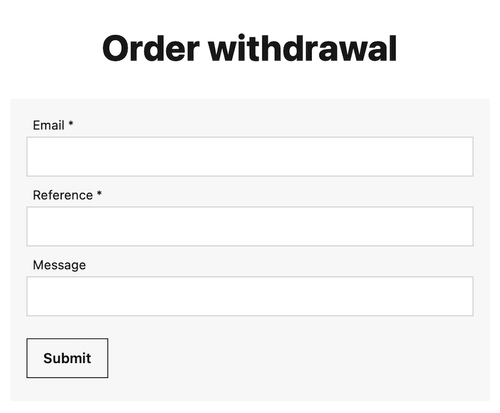
Consumers within the EU needs to be able to submit order withdrawals as easy as placing orders. The legislation mandates the process that includes two steps, (1) initiation and (2) confirmation. The initiation needs to be accessible without login and for default setups an order withdrawal form can be reached with the URL https://site-url/order/withdrawal.
Withdrawal template
In case your theme doesn’t already have a withdrawal template you can create one yourself. Using the theme editor, create a withdrawal.liquid file under either templates/order or templates/checkout.
{% assign pageTitle = 'Order withdrawal' | t %}
{% title pageTitle %}
<section>
    <h1>{{pageTitle}}</h1>
    {% if withdrawal.error != empty %}
			<p><strong>{{'Request failed' | t}}</strong> {{withdrawal.error | t }}</p>
    {% elseif withdrawal != empty %}
			<p>{{"Order withdrawal request has been received" | t}}</p>
			<p>{{"Consult our"| t}} <a href="{{'page/terms' | url}}">{{"terms and conditions" |t}}</a> {{"regarding refunds and shipment returns" | t}}.</p>
    {% else %}
       {% form 'order-withdrawal' %}{% endform %}
    {% endif %}
</section>
The withdrawal template handles both initiating and commiting a withdrawal.
- when a withdrawal is commited, it confirms the receival.
- if there is an
withdrawal.errorit shows the error message. - or it shows the order-withdrawal form.
Withdrawal form
Creating the order-withdrawal form. Under Admin -> Messages -> Forms click the Create form button and enter order-withdrawal as the handle, then add fields as illustrated below.
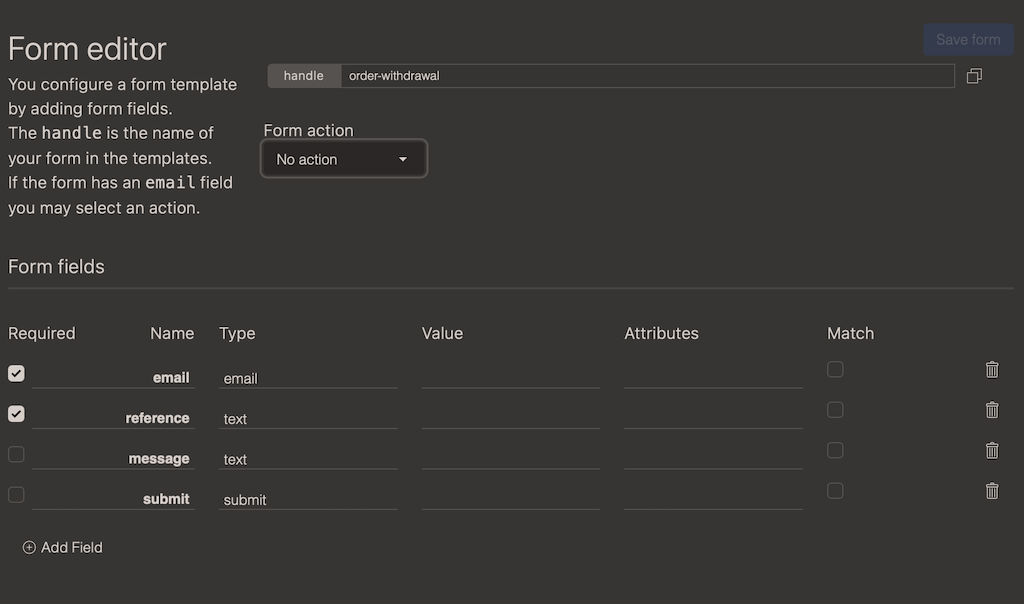
We have two required fields: customer email and order reference. You can however substitute these with some alternate fields.
- customer fields can be
email,usernameorcustomerId - order fields can be
referenceororderId
Since this is a form you may add additional fields such as message and feedback in case you want to gather additional feedback. No links or tags are allowed in the text fields.
With this form in place, you can insert the form wherever you like or link to the built in order/withdrawal template.
Form usage
Enter the following snippet where you want to include the withdrawal form.
{% form 'order-withdrawal' %}{% endform %}